
Last updated: November 8th 2026
Categories: Cyber Security, Linux
Author: Marcus Fleuti
Linux kernel CVE-2026-98432: protect Debian and Ubuntu servers with nftables
One crafted TCP connection request, and the Linux kernel reads memory it has already freed. CVE-2026-98432 is a use-after-free in the IPv4 TCP handshake of the Linux kernel, rated CVSS 9.8 (critical). It can be triggered over the network, without a login and before any application even sees the connection. This article explains how the bug works, which Debian and Ubuntu kernels are fixed and how a single nftables rule blocks the attack path until your server runs a patched kernel.
Status: 8 November 2026. Distribution status changes quickly - check the linked trackers for the latest versions.

Diesen Artikel gibt es auch auf Deutsch: Linux-Kernel-Lücke CVE-2026-98432: Debian- und Ubuntu-Server mit nftables schützen
CVE-2026-98432 at a glance
| Property | Value |
|---|---|
| CVE | CVE-2026-98432 |
| Component | Linux kernel, setup of IPv4 TCP connections |
| Type | Use-after-free caused by a race condition |
| Severity | CVSS 3.1: 9.8 critical - network attack, no privileges, no user interaction |
| Affected | Linux 4.4 and newer with a reachable IPv4 TCP port |
| Fixed upstream in | 5.10.272, 5.15.223, 6.1.190, 6.6.159, 6.12.113, 6.18.56, 7.2.10 and 7.3 |
| Fix | Commit e3f33b0a1d89 "ipv4: free inet_opt and ireq_opt after an RCU grace period" |
| Published | 15 October 2026 |
How the bug works
When a TCP connection request (SYN) arrives with IPv4 options such as Record Route or Timestamp, the kernel stores these options with the pending connection so it can echo them in its SYN-ACK. When the handshake completes, the kernel hands this memory over to the socket of the new connection - without making a copy.
If the client sends the same SYN again, a second CPU core can build another SYN-ACK from exactly these options at the same moment. If the first core tears down the new connection in the meantime, it frees the options immediately with kfree(). The second core then reads memory that no longer belongs to it.
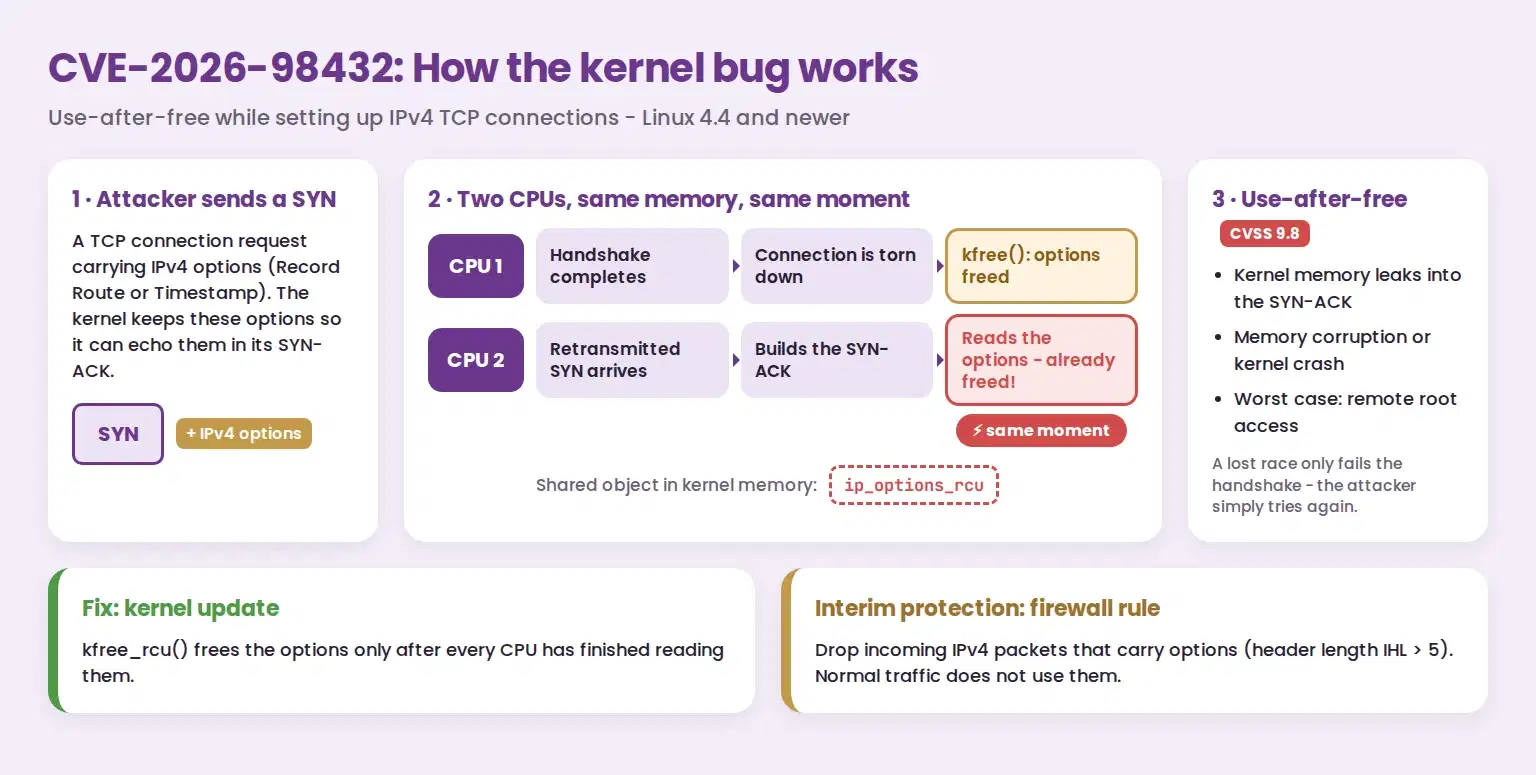
The consequences range from kernel memory leaking into the SYN-ACK to memory corruption and kernel crashes. Anthropic, whose researcher reported the bug, demonstrated remote command execution as root on a server with a Multipath TCP (MPTCP) listener: about 48 minutes to leak a kernel pointer, five more minutes to run a shell command. A lost race only fails the handshake, so an attacker can simply try again. The bug itself sits in the regular IPv4 TCP code - servers without MPTCP need the fix as well.
The fix frees the options with kfree_rcu(), i.e. only once no other CPU can still be reading them. IPv6 connections are not affected by the main issue.
Step 1: Check and update the kernel
First find out which kernel package is running:
# Debian: the package version follows the word "Debian"
uname -v

# Ubuntu: the package version follows the word "Ubuntu"
cat /proc/version_signature
Compare the version with the table:
| Distribution | Kernel package | Fixed in | Status on 8 November 2026 |
|---|---|---|---|
| Debian 12 "Bookworm" | linux |
6.1.190-1 (DLA-4841-1) | Fixed |
| Debian 12 "Bookworm" | linux-6.12 |
6.12.113-1~deb12u1 (DLA-4850-1) | Fixed |
| Debian 13 "Trixie" | linux |
6.12.113-1 (DSA-6568-1) | Fixed |
| Ubuntu 22.04 LTS | linux |
5.15.0-203.213 | Fix prepared, not yet released |
| Ubuntu 22.04 LTS (HWE) | linux-hwe-6.8 |
6.8.0-149.149~22.04.1 | Fix prepared, not yet released |
| Ubuntu 24.04 LTS | linux |
6.8.0-149.149 | Fix prepared, not yet released |
| Ubuntu 24.04 LTS (HWE) | linux-hwe-6.17 |
- | No fix yet |
| Ubuntu 26.04 LTS | linux |
7.0.0-43.43 | Fix prepared, not yet released |
| Ubuntu 26.10 | linux |
7.3.0-10.10 | Fixed |
Cloud kernels such as linux-aws, linux-azure or linux-gcp have their own versions - see the Ubuntu CVE page and the Debian Security Tracker. Install the updates and restart the server:
sudo apt update
sudo apt full-upgrade
sudo reboot
Run the version check again after the reboot. A new kernel only takes effect after a restart; on Ubuntu, the file /var/run/reboot-required shows that a restart is still pending.
Step 2: Block IPv4 options with nftables
As long as no patched kernel is running - on Ubuntu LTS this is currently the case - a firewall rule closes the attack path. The bug can only be triggered by packets that carry IPv4 options, and regular internet traffic practically never uses them. The rule therefore drops every incoming IPv4 packet with an options header (header length IHL > 5). The only exception is IGMP, because IGMPv2 and IGMPv3 need the Router Alert option for multicast.
This is the rule we run on our own servers:
# /etc/nftables.d/ipv4-options.nft
# Drops every incoming IPv4 packet with an options header (IHL > 5),
# except IGMP (IGMPv2/v3 need the Router Alert option).
# CVE-2026-98432: a SYN with IPv4 options triggers a use-after-free.
# prerouting covers all interfaces, including lo and docker0.
# Priority raw - 10 (= -310): before Docker's raw PREROUTING (-300) and conntrack.
table inet ipv4-options
delete table inet ipv4-options
table inet ipv4-options {
    counter dropped {
    }

    chain prerouting {
        type filter hook prerouting priority raw - 10; policy accept;
        ip hdrlength > 5 ip protocol != igmp limit rate 1/minute log prefix "nft-ipv4-options: "
        ip hdrlength > 5 ip protocol != igmp counter name "dropped" drop
    }
}
The first two lines make the file safe to load repeatedly: the table is created if it is missing, deleted and then defined from scratch. Other firewall rules - ufw, Docker or your own tables - stay untouched. The log line writes at most one message per minute, the named counter adds up all dropped packets.
Activate the rule
sudo apt install nftables                          # only if nft is missing
sudo install -d /etc/nftables.d
sudo nano /etc/nftables.d/ipv4-options.nft         # paste the rule
sudo nft -c -f /etc/nftables.d/ipv4-options.nft    # syntax check only
sudo nft -f /etc/nftables.d/ipv4-options.nft       # activate
Keep a second SSH session open while you activate it and test a fresh login - normal connections must keep working.
Keep the rule after a reboot
| Your server | What to do |
|---|---|
Firewall is managed in /etc/nftables.conf (systemctl is-enabled nftables shows enabled) |
Add the line include "/etc/nftables.d/ipv4-options.nft" at the end of /etc/nftables.conf. |
ufw, Docker or no active nftables.service |
Load the file with a small systemd unit (below). It adds the table at boot and does not flush any other rules. |
sudo tee /etc/systemd/system/nft-ipv4-options.service >/dev/null <<'EOF'
[Unit]
Description=Drop IPv4 packets with options (CVE-2026-98432)
DefaultDependencies=no
Wants=network-pre.target
Before=network-pre.target shutdown.target
After=nftables.service
Conflicts=shutdown.target

[Service]
Type=oneshot
RemainAfterExit=yes
ExecStart=/usr/sbin/nft -f /etc/nftables.d/ipv4-options.nft

[Install]
WantedBy=sysinit.target
EOF
sudo systemctl daemon-reload
sudo systemctl enable nft-ipv4-options.service
Check that it works
# Number of dropped packets
sudo nft list counter inet ipv4-options dropped

# Log entries (at most one per minute)
sudo journalctl -k -g nft-ipv4-options
Alternative: iptables
If you cannot use nft, the u32 match does the same job. It reads the IHL field from the first byte of the IPv4 header; values from 6 to 15 mean that options are present:
sudo iptables -t raw -I PREROUTING ! -p igmp -m u32 --u32 "0>>24&0xF=6:15" -j DROP

# Check the counter
sudo iptables -t raw -L PREROUTING -v -n
This rule is gone after a reboot. For a permanent setup, use the nftables variant above - on current Debian and Ubuntu releases, iptables runs on top of nftables anyway.
Step 3: Disable MPTCP if you do not need it
The published exploit uses a Multipath TCP listener. Programs written in Go open MPTCP listeners on Linux by default since Go 1.24 (announcement on oss-security). If you do not need MPTCP, switch it off:
sysctl net.mptcp.enabled                 # 1 = enabled

echo 'net.mptcp.enabled = 0' | sudo tee /etc/sysctl.d/90-disable-mptcp.conf
sudo sysctl -w net.mptcp.enabled=0

sudo ss -lnMp                            # MPTCP listeners that are still open
The switch only prevents new MPTCP sockets. Restart the services that still appear in the list.
Limits of the interim protection
- Not a fix: The firewall rule blocks the known attack path, but only the kernel update removes the bug. Install it as soon as your distribution ships it.
- Containers: The rule protects the host and the containers that receive their traffic through it, which is the default for Docker. Traffic between containers on the same host can bypass it.
- CIPSO/NetLabel: Networks that rely on CIPSO security labels carry them in IPv4 options - do not use the rule there.
- IPv6: The main issue does not affect IPv6, no extra rule is needed.
- Keep it? IPv4 options practically never occur in regular traffic. We keep the rule permanently, even after the kernel update.
Summary
| Measure | Effect | When |
|---|---|---|
| Kernel update and reboot | Removes the bug | Debian: now. Ubuntu LTS: as soon as the update is released |
| nftables rule | Blocks the attack path (IPv4 options) | Immediately, no reboot required |
| Disable MPTCP | Removes the setup of the published exploit | If MPTCP is not needed |
How we handled it at LEXO
We updated all our Linux servers, rolled out the rule above on every one of them and monitor counters and logs around the clock. Customers with our managed hosting and monitoring did not have to do anything. If you want the same for your servers, get in touch.