
Created: January 20th 2026
Last updated: January 20th 2026
Categories: IT Support, Windwos Server
Author: Andreas Fässler
Last updated: January 20th 2026
Categories: IT Support, Windwos Server
Author: Andreas Fässler
Active Directory Benutzer erstellen: Manuell und per Automatisierung
Benutzer manuell erstellen:
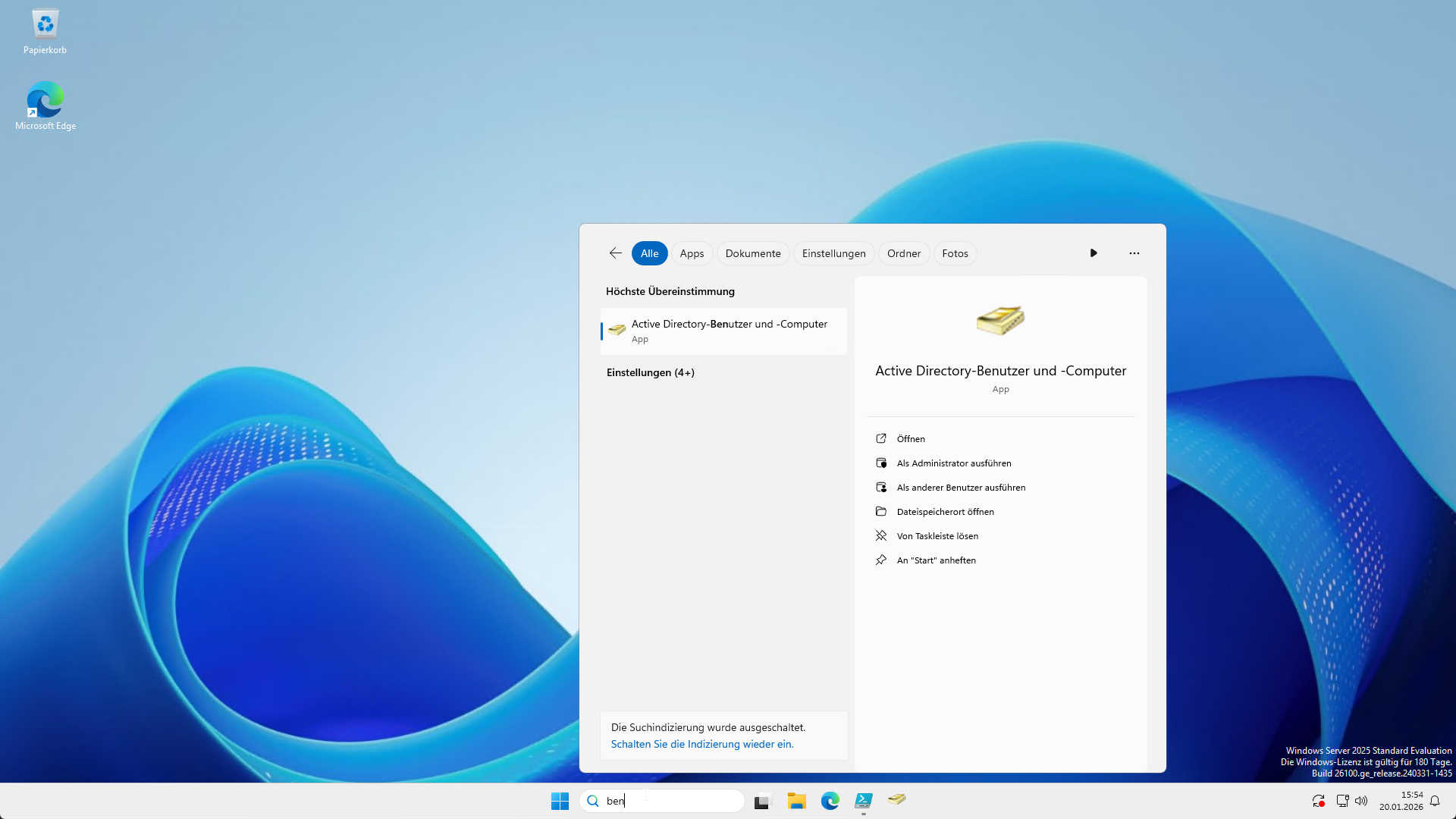
- Benutzer und Computer öffnen.
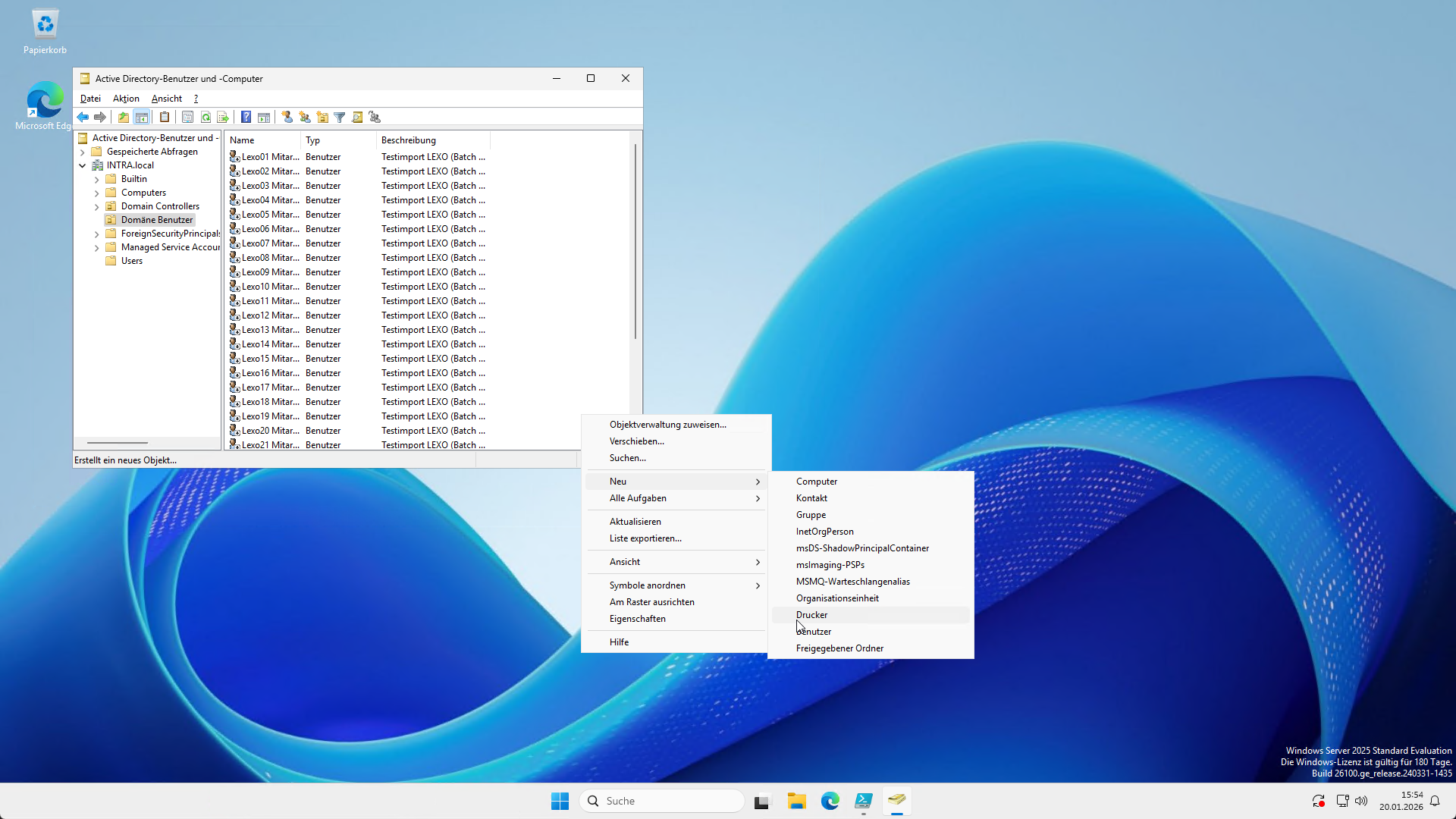
- Im gewünschten Ordner(OU) Rechtsklicken und den Benutzer auswählen.
OUs können auch über Rechtsklick-> Organisationseinheit erstellt werden.
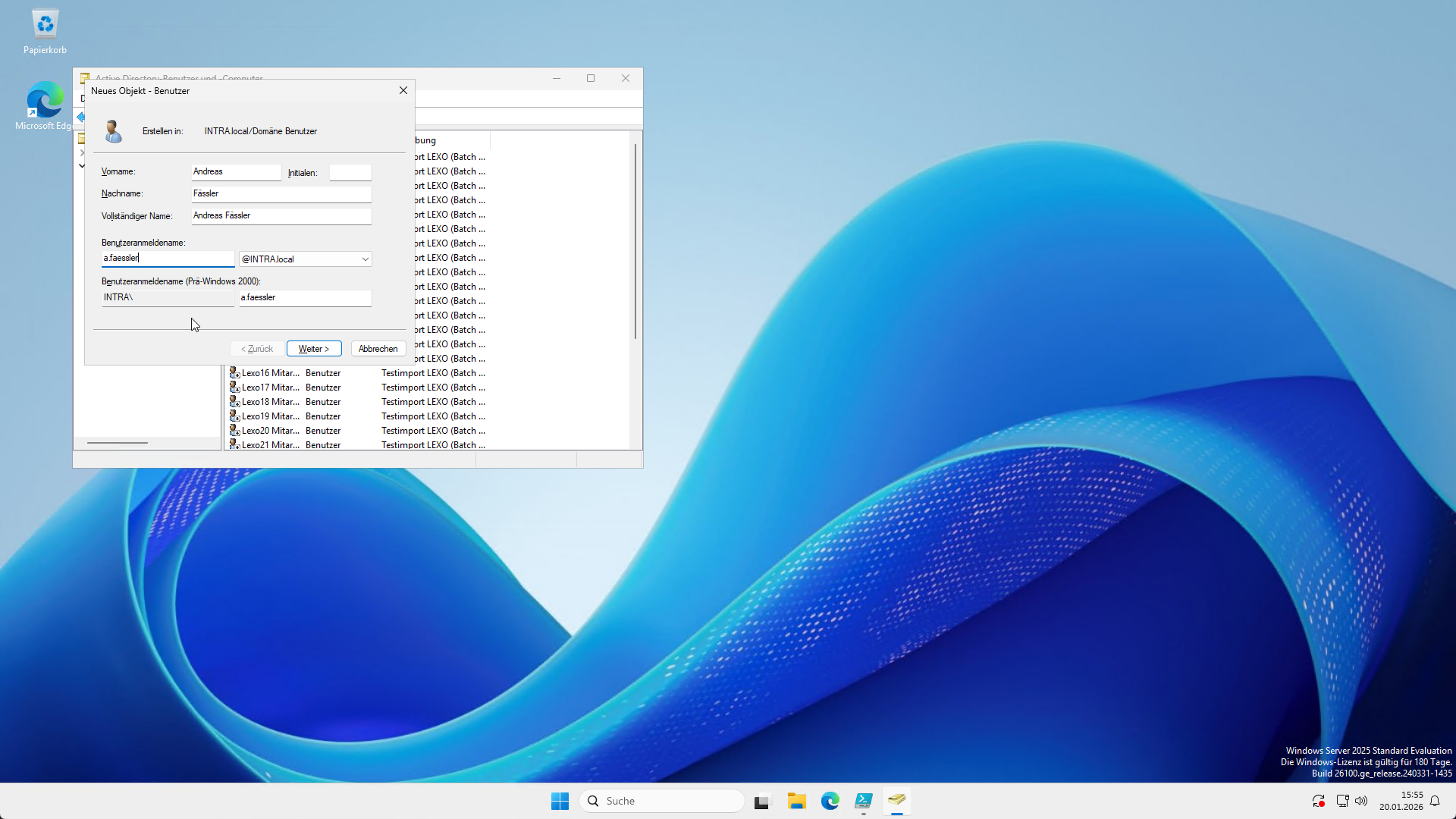
- Angaben ausfüllen.
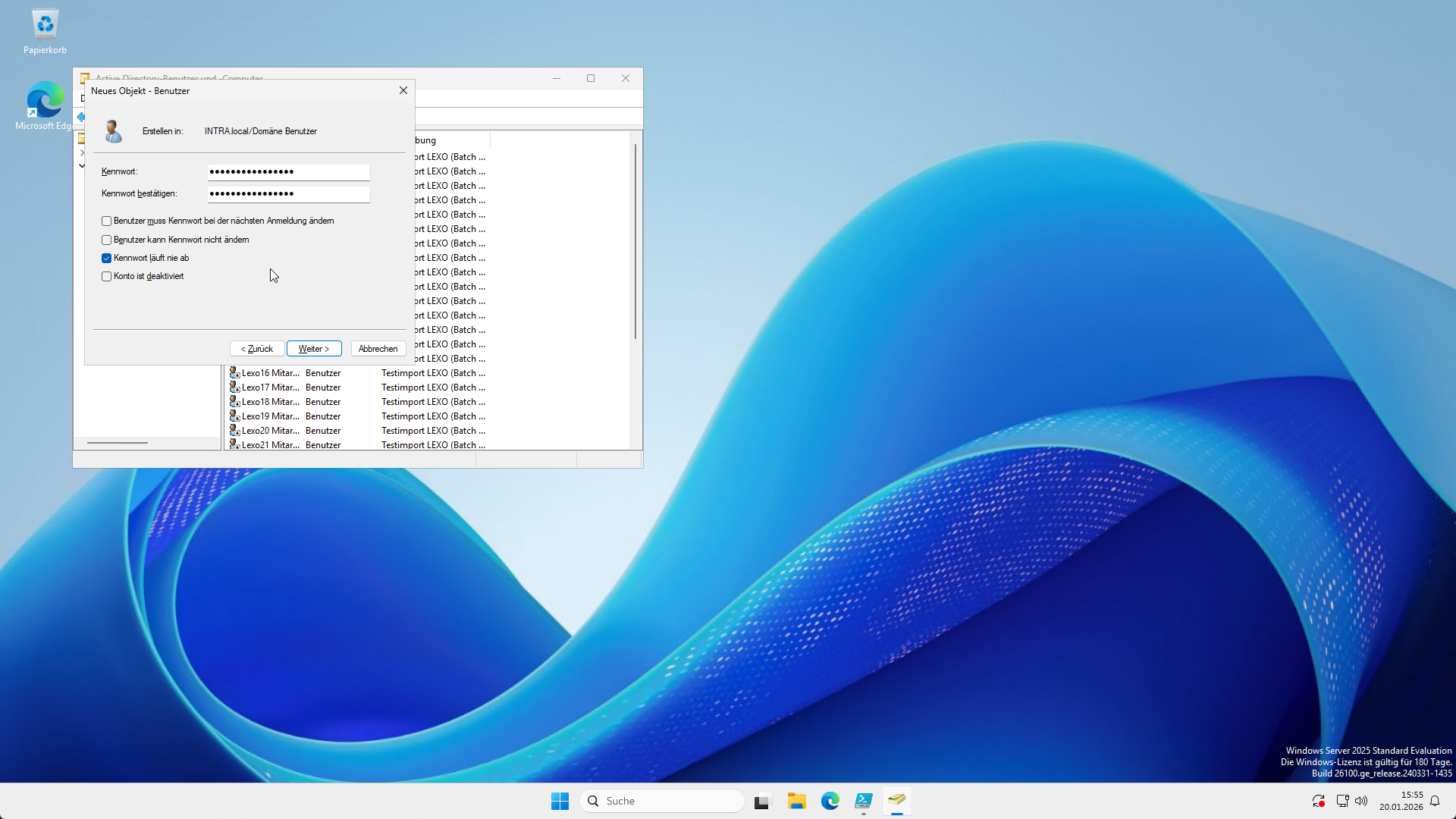
- PW eingeben. Zu empfehlen ist "Benutzer muss das Kennwort beim nächsten Login ändern" zu deaktivieren.
Die AD hat eine relativ strikte Passwortrichtline, deshalb müssen Sie ein Starkes Passwort nutzen.
- Wenn Sie nun auf "Fertig stellen" klicken sehen Sie Ihren erstellten Benutzer in der OU.
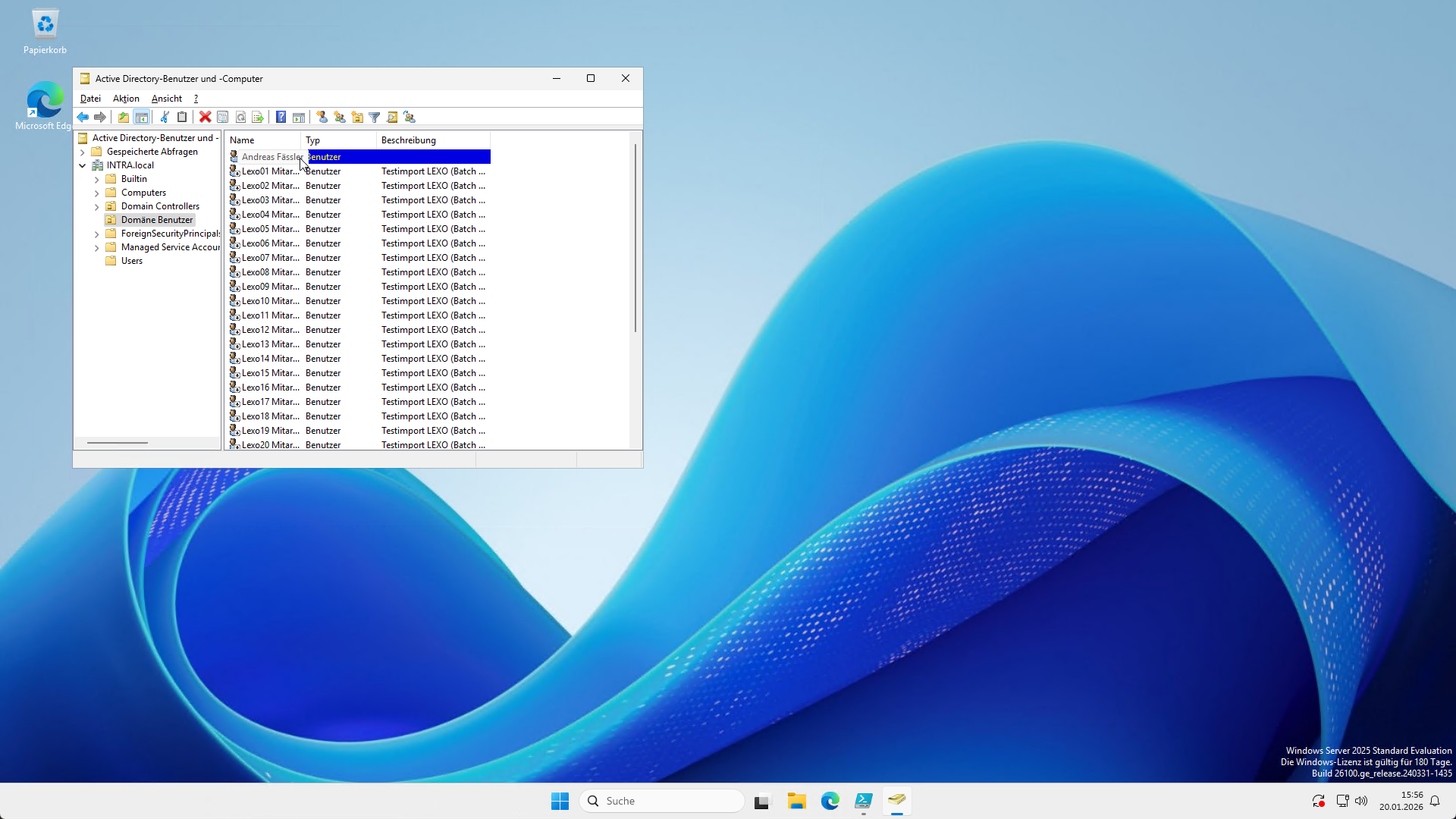
Stellen Sie sich vor, Sie müssen 100 Benutzer erstellen. Am besten/schnellsten machen Sie dies über ein Skript.
Mehrere Benutzer mit einem PowerShell Skript erstellen.
Am einfachsten geht dies mit einem PowerShell Skript und einer CSV Datei.
Inhalt der CSV Datei:
GivenName;Surname;SamAccountName;UserPrincipalName;Password;Department;Title;Office;Company;EmailAddress
Luca;Meier;lexo.tuser01;lexo.tuser01@intra.local;KaffeeLicht7!;IT Operations;Endpoint Alchemist;Zurich;LEXO Systems AG;lexo.tuser01@intra.local
Mia;Mueller;lexo.tuser02;lexo.tuser02@intra.local;BergTaxi42?;IT Security;Zero Trust Architect;Bern;LEXO Digital AG;lexo.tuser02@intra.local
Noah;Schmid;lexo.tuser03;lexo.tuser03@intra.local;SommerWolke19#;Data & Analytics;Data Pipeline Whisperer;Basel;LEXO Labs AG;lexo.tuser03@intra.local
Emma;Keller;lexo.tuser04;lexo.tuser04@intra.local;ApfelFenster6!;Digital Workplace;Workflow Mechanic;Winterthur;LEXO Systems AG;lexo.tuser04@intra.local
Leon;Weber;lexo.tuser05;lexo.tuser05@intra.local;MondGarten88@;Platform Engineering;Cloud Cartographer;St. Gallen;LEXO Digital AG;lexo.tuser05@intra.local
Lina;Fischer;lexo.tuser06;lexo.tuser06@intra.local;TaschenLampe3$;Service Management;Incident Navigator;Luzern;LEXO Labs AG;lexo.tuser06@intra.local
Elias;Baumann;lexo.tuser07;lexo.tuser07@intra.local;WasserBruecke27!;QA & Testing;Automation Tactician;Zurich;LEXO Systems AG;lexo.tuser07@intra.local
Sofia;Wagner;lexo.tuser08;lexo.tuser08@intra.local;KirschBahn14%?;Automation Lab;Patch Conductor;Bern;LEXO Digital AG;lexo.tuser08@intra.local
Finn;Huber;lexo.tuser09;lexo.tuser09@intra.local;NebelKiste59#;IT Operations;Observability Scout;Basel;LEXO Labs AG;lexo.tuser09@intra.local
Nina;Steiner;lexo.tuser10;lexo.tuser10@intra.local;HonigSpiegel8!;IT Security;Identity Wrangler;Winterthur;LEXO Systems AG;lexo.tuser10@intra.local
Jonas;Brunner;lexo.tuser11;lexo.tuser11@intra.local;PilotWiese33@;Data & Analytics;Data Pipeline Whisperer;St. Gallen;LEXO Digital AG;lexo.tuser11@intra.local
Laura;Frei;lexo.tuser12;lexo.tuser12@intra.local;FahrradStern21!;Digital Workplace;Endpoint Alchemist;Luzern;LEXO Labs AG;lexo.tuser12@intra.local
Liam;Graf;lexo.tuser13;lexo.tuser13@intra.local;KeksRegal70#;Platform Engineering;Cloud Cartographer;Zurich;LEXO Systems AG;lexo.tuser13@intra.local
Hanna;Bieri;lexo.tuser14;lexo.tuser14@intra.local;BlumeKabel12?;Service Management;Incident Navigator;Bern;LEXO Digital AG;lexo.tuser14@intra.local
Ben;Schneider;lexo.tuser15;lexo.tuser15@intra.local;WaldTempo64!;QA & Testing;Workflow Mechanic;Basel;LEXO Labs AG;lexo.tuser15@intra.local
Lea;Zimmermann;lexo.tuser16;lexo.tuser16@intra.local;SchneeRadio9$;Automation Lab;Automation Tactician;Winterthur;LEXO Systems AG;lexo.tuser16@intra.local
David;Roth;lexo.tuser17;lexo.tuser17@intra.local;BuecherZug47#;IT Operations;Patch Conductor;St. Gallen;LEXO Digital AG;lexo.tuser17@intra.local
Sara;Kunz;lexo.tuser18;lexo.tuser18@intra.local;GabelSonne25!;IT Security;Zero Trust Architect;Luzern;LEXO Labs AG;lexo.tuser18@intra.local
Mateo;Moser;lexo.tuser19;lexo.tuser19@intra.local;KarteHafen73@;Data & Analytics;Observability Scout;Zurich;LEXO Systems AG;lexo.tuser19@intra.local
Jana;Suter;lexo.tuser20;lexo.tuser20@intra.local;LampeFluss16?;Digital Workplace;Identity Wrangler;Bern;LEXO Digital AG;lexo.tuser20@intra.local
Tim;Gasser;lexo.tuser21;lexo.tuser21@intra.local;RucksackKiesel5!;Platform Engineering;Cloud Cartographer;Basel;LEXO Labs AG;lexo.tuser21@intra.local
Alina;Lenz;lexo.tuser22;lexo.tuser22@intra.local;FensterKran31#;Service Management;Incident Navigator;Winterthur;LEXO Systems AG;lexo.tuser22@intra.local
Fabian;Hofmann;lexo.tuser23;lexo.tuser23@intra.local;ZitroneBrett90!;QA & Testing;Workflow Mechanic;St. Gallen;LEXO Digital AG;lexo.tuser23@intra.local
Chiara;Bachmann;lexo.tuser24;lexo.tuser24@intra.local;BrilleFunk18@;Automation Lab;Automation Tactician;Luzern;LEXO Labs AG;lexo.tuser24@intra.local
Samuel;Arnold;lexo.tuser25;lexo.tuser25@intra.local;KellerWetter66?;IT Operations;Endpoint Alchemist;Zurich;LEXO Systems AG;lexo.tuser25@intra.local
Elena;Schwarz;lexo.tuser26;lexo.tuser26@intra.local;DoseWinkel24!;IT Security;Zero Trust Architect;Bern;LEXO Digital AG;lexo.tuser26@intra.local
Milan;Koch;lexo.tuser27;lexo.tuser27@intra.local;TrommelEcke52#;Data & Analytics;Data Pipeline Whisperer;Basel;LEXO Labs AG;lexo.tuser27@intra.local
Nora;Vogel;lexo.tuser28;lexo.tuser28@intra.local;WolkeGitter11!;Digital Workplace;Identity Wrangler;Winterthur;LEXO Systems AG;lexo.tuser28@intra.local
Levi;Marti;lexo.tuser29;lexo.tuser29@intra.local;BahnKiesel78@;Platform Engineering;Cloud Cartographer;St. Gallen;LEXO Digital AG;lexo.tuser29@intra.local
Talia;Hauser;lexo.tuser30;lexo.tuser30@intra.local;SofaKamin37?;Service Management;Incident Navigator;Luzern;LEXO Labs AG;lexo.tuser30@intra.local
PowerShell Skript:
IImport-Module ActiveDirectory -ErrorAction Stop

# Pfad zur CSV
$CsvPath   = "C:\Users\Administrator\Desktop\benutzer.csv"

# Fixe Vorgaben
$HomeRoot  = "\\SRV-File-01\Homedirectory"
$HomeDrive = "H:"

# Domain DN fuer OU-Pfad
$domain   = Get-ADDomain
$domainDN = $domain.DistinguishedName

# Ziel-OU (wie von dir gewuenscht)
$TargetOU = "OU=Domäne Benutzer,$domainDN"

# OU muss existieren
try {
    Get-ADOrganizationalUnit -Identity $TargetOU -ErrorAction Stop | Out-Null
} catch {
    throw "Ziel-OU nicht gefunden: $TargetOU. Bitte OU in AD anlegen oder DN pruefen."
}

# CSV einlesen (Semikolon)
$users = Import-Csv -Path $CsvPath -Delimiter ';'

foreach ($u in $users) {

    # Pflichtfelder pruefen (minimal)
    if ([string]::IsNullOrWhiteSpace($u.SamAccountName) -or
        [string]::IsNullOrWhiteSpace($u.UserPrincipalName) -or
        [string]::IsNullOrWhiteSpace($u.Password)) {
        Write-Host "SKIP: Unvollstaendiger Datensatz in CSV (SamAccountName/UPN/Password fehlt)."
        continue
    }

    $sam   = $u.SamAccountName.Trim()
    $upn   = $u.UserPrincipalName.Trim()
    $pwd   = $u.Password

    $given = $u.GivenName
    $sur   = $u.Surname
    $disp  = "$given $sur"

    $homeDir = Join-Path $HomeRoot $sam

    # Existenzpruefung
    $exists = Get-ADUser -Filter "SamAccountName -eq '$sam'" -ErrorAction SilentlyContinue
    if ($exists) {
        Write-Host "SKIP: Benutzer existiert bereits: $sam"
        continue
    }

    # Passwort pro User
    $securePw = ConvertTo-SecureString $pwd -AsPlainText -Force

    Write-Host "CREATE: $sam  UPN=$upn  OU=$TargetOU  Home=$homeDir"

    New-ADUser `
        -Name $disp `
        -GivenName $given `
        -Surname $sur `
        -DisplayName $disp `
        -SamAccountName $sam `
        -UserPrincipalName $upn `
        -Department $u.Department `
        -Title $u.Title `
        -Office $u.Office `
        -Company $u.Company `
        -EmailAddress $u.EmailAddress `
        -Path $TargetOU `
        -AccountPassword $securePw `
        -Enabled $true `
        -ChangePasswordAtLogon $false `
        -HomeDirectory $homeDir `
        -HomeDrive $HomeDrive
}

Write-Host "Fertig."
Anleitung
- Erstellen Sie die CSV Datei auf Ihrem Server.
- Geben Sie das PowerShell Skript im ISE ein.
- Allenfalls müssen Sie den Pfad zur CSV anpassen.
- Allenfalls müssen Sie die OU= Domäne Benutzer anpassen.
- Führen Sie das Skript aus.
- In Benutzer und Computer sollten Sie nun die Benutzer sehen.